<?xml version="1.0" encoding="utf-8"?><feed xml:lang="zh-CN" xmlns="http://www.w3.org/2005/Atom"><title>Restent&#39;s Notebook</title><subtitle>Restent Ou 的技术笔记本，分享我所感兴趣的技术相关内容。</subtitle><id>https://blog.gxres.net/</id><updated>2026-04-30T11:38:40.269Z</updated><generator>Noutious + Nuxt + zfeed</generator><logo><normal>https://library.gxres.net/images/icons/favicon.ico</normal><big>https://library.gxres.net/images/icons/big-favicon.webp</big></logo><rights>Copyright © 2019 - 2026 Restent&#39;s Notebook. All rights reserved.</rights><link rel="alternate" href="https://blog.gxres.net/" /><link rel="self" href="https://blog.gxres.net/atom.xml" type="application/atom+xml" /><author><name>Restent Ou</name><uri>https://blog.gxres.net</uri></author><entry><title>在 Vue 或 Svelte 项目上使用 StyleX</title><id>https://blog.gxres.net/post/use-stylex-on-vue-or-svelte-project/</id><link rel="alternate" href="https://blog.gxres.net/post/use-stylex-on-vue-or-svelte-project/" /><updated>2026-04-28T18:30:36.000Z</updated><published>2026-04-28T18:30:36.000Z</published><summary type="html"><![CDATA[我近期沉迷于 Atomic CSS-in-JS。本博客目前使用 Panda CSS 生成样式，但通过 PostCSS 使用 Panda CSS 会获得非常稀烂的开发体验，我也不太喜欢使用 CLI Mode，故将目光转移至 Facebook 的 StyleX。本文将会介绍一种在 Vue 或 Svelte 项目上使用 StyleX 的方法。]]></summary><content type="html"><![CDATA[
    <p>我近期沉迷于 Atomic CSS-in-JS。本博客目前使用 Panda CSS 生成样式，但通过 PostCSS 使用 Panda CSS 会获得非常稀烂的开发体验，我也不太喜欢使用 CLI Mode，故将目光转移至 Facebook 的 StyleX。本文将会介绍一种在 Vue 或 Svelte 项目上使用 StyleX 的方法。</p>
    <img src="https://storage.sirvr.win/images/use-stylex-on-vue-or-svelte-project/banner.webp" alt="在 Vue 或 Svelte 项目上使用 StyleX">
    <p>请访问 <a href="https://blog.gxres.net/post/use-stylex-on-vue-or-svelte-project/">https://blog.gxres.net/post/use-stylex-on-vue-or-svelte-project/</a> 以阅读全文。</p>
    ]]></content><author><name>Restent Ou</name><uri>https://blog.gxres.net</uri></author></entry><entry><title>资源的精打细算：家里云虚拟机的拆分与融合</title><id>https://blog.gxres.net/post/virtual-machine-splitting-and-merging/</id><link rel="alternate" href="https://blog.gxres.net/post/virtual-machine-splitting-and-merging/" /><updated>2026-03-19T17:32:36.000Z</updated><published>2026-03-19T17:32:36.000Z</published><summary type="html"><![CDATA[本篇文章主要围绕我的家里云上的、用于网络服务的 Linux 虚拟机和用于挂 QQ 的 Windows 虚拟机，用口水话讲述我是如何通过「拆分」和「融合」虚拟机、以节省内存消耗的。]]></summary><content type="html"><![CDATA[
    <p>本篇文章主要围绕我的家里云上的、用于网络服务的 Linux 虚拟机和用于挂 QQ 的 Windows 虚拟机，用口水话讲述我是如何通过「拆分」和「融合」虚拟机、以节省内存消耗的。</p>
    
    <p>请访问 <a href="https://blog.gxres.net/post/virtual-machine-splitting-and-merging/">https://blog.gxres.net/post/virtual-machine-splitting-and-merging/</a> 以阅读全文。</p>
    ]]></content><author><name>Restent Ou</name><uri>https://blog.gxres.net</uri></author></entry><entry><title>网站「优如化」和「防如护」踩坑指北</title><id>https://blog.gxres.net/post/optimize-and-protect-your-website/</id><link rel="alternate" href="https://blog.gxres.net/post/optimize-and-protect-your-website/" /><updated>2026-03-01T16:30:23.000Z</updated><published>2026-03-01T16:30:23.000Z</published><summary type="html"><![CDATA[之前一直在搜索相关资料、以进一步优化本站的性能并提升本站的防护，但网络上做「优化」和「防护」的缘由算是众说纷纭、一个比一个离谱。因此，这篇文章我将瞎写一通、抛开一切杂七杂八的、过多考虑无任何意义的外部因素、回归到本质问题，以「网站优化」和「网站防护」两个方面出发，分享一路上如何精准进行一个踩坑。]]></summary><content type="html"><![CDATA[
    <p>之前一直在搜索相关资料、以进一步优化本站的性能并提升本站的防护，但网络上做「优化」和「防护」的缘由算是众说纷纭、一个比一个离谱。因此，这篇文章我将瞎写一通、抛开一切杂七杂八的、过多考虑无任何意义的外部因素、回归到本质问题，以「网站优化」和「网站防护」两个方面出发，分享一路上如何精准进行一个踩坑。</p>
    
    <p>请访问 <a href="https://blog.gxres.net/post/optimize-and-protect-your-website/">https://blog.gxres.net/post/optimize-and-protect-your-website/</a> 以阅读全文。</p>
    ]]></content><author><name>Restent Ou</name><uri>https://blog.gxres.net</uri></author></entry><entry><title>【转载】Introducing Heimdall - Minecraft 正版服反黑卡解决方案</title><id>https://blog.gxres.net/post/introducing-heimdall/</id><link rel="alternate" href="https://blog.gxres.net/post/introducing-heimdall/" /><updated>2026-02-28T15:25:23.000Z</updated><published>2026-02-28T15:25:23.000Z</published><summary type="html"><![CDATA[Heimdall 是一个 Minecraft 正版服反黑卡解决方案。通过周期性地验证正版 Minecraft 账号对应的 Microsoft 帐户的归属，确保当前登录服务器的玩家是该账号的合法拥有者，从而保护 Minecraft 服务器免受黑卡账号的破坏，维护 Minecraft 社区和正版玩家的权益。]]></summary><content type="html"><![CDATA[
    <p>Heimdall 是一个 Minecraft 正版服反黑卡解决方案。通过周期性地验证正版 Minecraft 账号对应的 Microsoft 帐户的归属，确保当前登录服务器的玩家是该账号的合法拥有者，从而保护 Minecraft 服务器免受黑卡账号的破坏，维护 Minecraft 社区和正版玩家的权益。</p>
    <img src="https://storage.sirvr.win/images/introducing-heimdall/banner.webp" alt="【转载】Introducing Heimdall - Minecraft 正版服反黑卡解决方案">
    <p>请访问 <a href="https://blog.gxres.net/post/introducing-heimdall/">https://blog.gxres.net/post/introducing-heimdall/</a> 以阅读全文。</p>
    ]]></content><author><name>Restent Ou</name><uri>https://blog.gxres.net</uri></author></entry><entry><title>我的 2025 年度总结</title><id>https://blog.gxres.net/post/2025-annual-summary/</id><link rel="alternate" href="https://blog.gxres.net/post/2025-annual-summary/" /><updated>2025-12-12T16:09:56.000Z</updated><published>2025-12-12T16:09:56.000Z</published><summary type="html"><![CDATA[2025 仍然是在不知不觉中结束了，也许是这一年比较忙吧。按照惯例，今年也得写一篇年度总结才行。]]></summary><content type="html"><![CDATA[
    <p>2025 仍然是在不知不觉中结束了，也许是这一年比较忙吧。按照惯例，今年也得写一篇年度总结才行。</p>
    <img src="https://storage.sirvr.win/images/2025-annual-summary/banner.webp" alt="我的 2025 年度总结">
    <p>请访问 <a href="https://blog.gxres.net/post/2025-annual-summary/">https://blog.gxres.net/post/2025-annual-summary/</a> 以阅读全文。</p>
    ]]></content><author><name>Restent Ou</name><uri>https://blog.gxres.net</uri></author></entry><entry><title>使用 Noutious 和 Nuxt 重构我的博客</title><id>https://blog.gxres.net/post/refactor-tech-blog-with-noutious-and-nuxt/</id><link rel="alternate" href="https://blog.gxres.net/post/refactor-tech-blog-with-noutious-and-nuxt/" /><updated>2025-12-12T13:56:00.000Z</updated><published>2025-12-12T13:56:00.000Z</published><summary type="html"><![CDATA[去年的 4 月 13 号，我用 Nuxt 3 和 Nuxt Content v2 重构了我的博客、并稳定运行到了今年年末；今年年末，趁着终于有点动力、以及 Noutious 在 R2's thoughts 顺利工作，我用 Noutious 和 Nuxt 4 再次重构了我的博客。咳咳，由于本文之前写的过于简单，因此我在年末重新写了一版、希望能将重构博客中的大部分细节带给屏幕前的你。]]></summary><content type="html"><![CDATA[
    <p>去年的 4 月 13 号，我用 Nuxt 3 和 Nuxt Content v2 重构了我的博客、并稳定运行到了今年年末；今年年末，趁着终于有点动力、以及 Noutious 在 R2's thoughts 顺利工作，我用 Noutious 和 Nuxt 4 再次重构了我的博客。咳咳，由于本文之前写的过于简单，因此我在年末重新写了一版、希望能将重构博客中的大部分细节带给屏幕前的你。</p>
    
    <p>请访问 <a href="https://blog.gxres.net/post/refactor-tech-blog-with-noutious-and-nuxt/">https://blog.gxres.net/post/refactor-tech-blog-with-noutious-and-nuxt/</a> 以阅读全文。</p>
    ]]></content><author><name>Restent Ou</name><uri>https://blog.gxres.net</uri></author></entry><entry><title>使用 Noutious 和 SvelteKit 构建一个船新的博客</title><id>https://blog.gxres.net/post/build-a-new-blog-with-noutious-and-svelte/</id><link rel="alternate" href="https://blog.gxres.net/post/build-a-new-blog-with-noutious-and-svelte/" /><updated>2025-11-25T04:41:00.000Z</updated><published>2025-11-25T04:41:00.000Z</published><summary type="html"><![CDATA[让我用一篇文章告诉你：一个年中就挖出来的坑，是如何用了几个月的时间才填满的（]]></summary><content type="html"><![CDATA[
    <p>让我用一篇文章告诉你：一个年中就挖出来的坑，是如何用了几个月的时间才填满的（</p>
    
    <p>请访问 <a href="https://blog.gxres.net/post/build-a-new-blog-with-noutious-and-svelte/">https://blog.gxres.net/post/build-a-new-blog-with-noutious-and-svelte/</a> 以阅读全文。</p>
    ]]></content><author><name>Restent Ou</name><uri>https://blog.gxres.net</uri></author></entry><entry><title>从 SmartDNS 到 mosdns 的迁徙</title><id>https://blog.gxres.net/post/migrate-from-smartdns-to-mosdns/</id><link rel="alternate" href="https://blog.gxres.net/post/migrate-from-smartdns-to-mosdns/" /><updated>2025-07-25T15:03:05.000Z</updated><published>2025-07-25T15:03:05.000Z</published><summary type="html"><![CDATA[家里的「家里云」服务器上有一个虚拟机，这个虚拟机里安装有一个名为 SmartDNS 的 DNS 转发器，是我经历几次 DNS 问题后、为防后患部署的服务。但是，这几天维护的时候，原有的配置在重启 SmartDNS 之后无法使用、也不知道到底是因为什么报错。想起有个大手子在很久之前推荐了同样为 DNS 转发器的 mosdns，所以就浅尝试了一下。]]></summary><content type="html"><![CDATA[
    <p>家里的「家里云」服务器上有一个虚拟机，这个虚拟机里安装有一个名为 SmartDNS 的 DNS 转发器，是我经历几次 DNS 问题后、为防后患部署的服务。但是，这几天维护的时候，原有的配置在重启 SmartDNS 之后无法使用、也不知道到底是因为什么报错。想起有个大手子在很久之前推荐了同样为 DNS 转发器的 mosdns，所以就浅尝试了一下。</p>
    
    <p>请访问 <a href="https://blog.gxres.net/post/migrate-from-smartdns-to-mosdns/">https://blog.gxres.net/post/migrate-from-smartdns-to-mosdns/</a> 以阅读全文。</p>
    ]]></content><author><name>Restent Ou</name><uri>https://blog.gxres.net</uri></author></entry><entry><title>通过 Proxmox VE 上的 Debian Cloud 虚拟机与 CUPS 共享打印机</title><id>https://blog.gxres.net/post/share-printer-through-vm-on-proxmox-ve-and-cups/</id><link rel="alternate" href="https://blog.gxres.net/post/share-printer-through-vm-on-proxmox-ve-and-cups/" /><updated>2025-05-03T16:00:00.000Z</updated><published>2025-05-03T16:00:00.000Z</published><summary type="html"><![CDATA[最近入手了一台兄弟的 HL-1118 黑白激光打印机。这台打印机仅支持有线连接，但不要紧、我有着 7x24 小时开机的「家里云」，所以我将打印机连接到了「家里云」主机、在 Proxmox VE 上将其直通到专门跑服务用的 Debian Cloud 虚拟机，并通过 CUPS 共享到局域网、让局域网的设备轻松使用这一台打印机打印资料。]]></summary><content type="html"><![CDATA[
    <p>最近入手了一台兄弟的 HL-1118 黑白激光打印机。这台打印机仅支持有线连接，但不要紧、我有着 7x24 小时开机的「家里云」，所以我将打印机连接到了「家里云」主机、在 Proxmox VE 上将其直通到专门跑服务用的 Debian Cloud 虚拟机，并通过 CUPS 共享到局域网、让局域网的设备轻松使用这一台打印机打印资料。</p>
    
    <p>请访问 <a href="https://blog.gxres.net/post/share-printer-through-vm-on-proxmox-ve-and-cups/">https://blog.gxres.net/post/share-printer-through-vm-on-proxmox-ve-and-cups/</a> 以阅读全文。</p>
    ]]></content><author><name>Restent Ou</name><uri>https://blog.gxres.net</uri></author></entry><entry><title>我的 2024 年度总结</title><id>https://blog.gxres.net/post/2024-annual-summary/</id><link rel="alternate" href="https://blog.gxres.net/post/2024-annual-summary/" /><updated>2024-12-29T16:00:00.000Z</updated><published>2024-12-29T16:00:00.000Z</published><summary type="html"><![CDATA[2024 年走到了它的尽头，是时候动笔写一篇年度总结了。介于我自认为今年的生活实在太枯燥，本文仅挑了点各位可能感兴趣的事来讲。]]></summary><content type="html"><![CDATA[
    <p>2024 年走到了它的尽头，是时候动笔写一篇年度总结了。介于我自认为今年的生活实在太枯燥，本文仅挑了点各位可能感兴趣的事来讲。</p>
    <img src="https://storage.sirvr.win/images/2024-annual-summary.webp" alt="我的 2024 年度总结">
    <p>请访问 <a href="https://blog.gxres.net/post/2024-annual-summary/">https://blog.gxres.net/post/2024-annual-summary/</a> 以阅读全文。</p>
    ]]></content><author><name>Restent Ou</name><uri>https://blog.gxres.net</uri></author></entry><entry><title>2024 年，将网站部署到 Cloudflare Workers</title><id>https://blog.gxres.net/post/deploy-website-to-cloudflare-workers-in-2024/</id><link rel="alternate" href="https://blog.gxres.net/post/deploy-website-to-cloudflare-workers-in-2024/" /><updated>2024-10-05T16:00:00.000Z</updated><published>2024-10-05T16:00:00.000Z</published><summary type="html"><![CDATA[一觉醒来，才发现 Cloudflare 推出了一个 Workers 的新功能——Static Assets，我便以最快的速度将网站重新部署回了 Cloudflare Workers。]]></summary><content type="html"><![CDATA[
    <p>一觉醒来，才发现 Cloudflare 推出了一个 Workers 的新功能——Static Assets，我便以最快的速度将网站重新部署回了 Cloudflare Workers。</p>
    <img src="https://storage.sirvr.win/images/deploy-website-to-cloudflare-workers-in-2024.webp" alt="2024 年，将网站部署到 Cloudflare Workers">
    <p>请访问 <a href="https://blog.gxres.net/post/deploy-website-to-cloudflare-workers-in-2024/">https://blog.gxres.net/post/deploy-website-to-cloudflare-workers-in-2024/</a> 以阅读全文。</p>
    ]]></content><author><name>Restent Ou</name><uri>https://blog.gxres.net</uri></author></entry><entry><title>记一次用 Maven 编译 CoreProtect 插件</title><id>https://blog.gxres.net/post/compile-coreprotect-with-maven/</id><link rel="alternate" href="https://blog.gxres.net/post/compile-coreprotect-with-maven/" /><updated>2024-09-23T16:00:00.000Z</updated><published>2024-09-23T16:00:00.000Z</published><summary type="html"><![CDATA[CoreProtect 是一个用于快速数据记录和反窃听的 Minecraft 服务器插件，常见用法便是查询箱子被哪些玩家摸过。但是，如果你需要使用 CoreProtect 的最新特性，你必须自行编译插件，或是捐助作者、得到其编译的开发版插件。正好，有一个开服的朋友找我编译 CoreProtect，整个过程还蛮有意思，就小小的记录一下。]]></summary><content type="html"><![CDATA[
    <p>CoreProtect 是一个用于快速数据记录和反窃听的 Minecraft 服务器插件，常见用法便是查询箱子被哪些玩家摸过。但是，如果你需要使用 CoreProtect 的最新特性，你必须自行编译插件，或是捐助作者、得到其编译的开发版插件。正好，有一个开服的朋友找我编译 CoreProtect，整个过程还蛮有意思，就小小的记录一下。</p>
    
    <p>请访问 <a href="https://blog.gxres.net/post/compile-coreprotect-with-maven/">https://blog.gxres.net/post/compile-coreprotect-with-maven/</a> 以阅读全文。</p>
    ]]></content><author><name>Restent Ou</name><uri>https://blog.gxres.net</uri></author></entry><entry><title>在 Vite + Vue 项目上使用 vite-ssg 和 unplugin-vue-router</title><id>https://blog.gxres.net/post/use-vite-ssg-and-unplugin-vue-router-in-your-vite-vue-project/</id><link rel="alternate" href="https://blog.gxres.net/post/use-vite-ssg-and-unplugin-vue-router-in-your-vite-vue-project/" /><updated>2024-09-03T16:00:00.000Z</updated><published>2024-09-03T16:00:00.000Z</published><summary type="html"><![CDATA[原地起一个 Vite + Vue 3 项目、用于搭建博客的情况下，SSG 和路由必不可少。最近在用 Vite + Vue 3 模板做一个小项目，正好需要配置 SSG 和路由，故写下本文、给其他有需要的站长做一个参考。]]></summary><content type="html"><![CDATA[
    <p>原地起一个 Vite + Vue 3 项目、用于搭建博客的情况下，SSG 和路由必不可少。最近在用 Vite + Vue 3 模板做一个小项目，正好需要配置 SSG 和路由，故写下本文、给其他有需要的站长做一个参考。</p>
    <img src="https://storage.sirvr.win/images/use-vite-ssg-and-unplugin-vue-router-in-your-vite-vue-project/banner.webp" alt="在 Vite + Vue 项目上使用 vite-ssg 和 unplugin-vue-router">
    <p>请访问 <a href="https://blog.gxres.net/post/use-vite-ssg-and-unplugin-vue-router-in-your-vite-vue-project/">https://blog.gxres.net/post/use-vite-ssg-and-unplugin-vue-router-in-your-vite-vue-project/</a> 以阅读全文。</p>
    ]]></content><author><name>Restent Ou</name><uri>https://blog.gxres.net</uri></author></entry><entry><title>我终于给客厅电脑主机做了点升级</title><id>https://blog.gxres.net/post/upgrade-the-pc-in-the-living-room/</id><link rel="alternate" href="https://blog.gxres.net/post/upgrade-the-pc-in-the-living-room/" /><updated>2024-08-06T16:00:00.000Z</updated><published>2024-08-06T16:00:00.000Z</published><summary type="html"><![CDATA[曾经不断幻想着的事情，今天终于实现了。]]></summary><content type="html"><![CDATA[
    <p>曾经不断幻想着的事情，今天终于实现了。</p>
    
    <p>请访问 <a href="https://blog.gxres.net/post/upgrade-the-pc-in-the-living-room/">https://blog.gxres.net/post/upgrade-the-pc-in-the-living-room/</a> 以阅读全文。</p>
    ]]></content><author><name>Restent Ou</name><uri>https://blog.gxres.net</uri></author></entry><entry><title>Svelte 与 SvelteKit 的初尝试</title><id>https://blog.gxres.net/post/first-try-svelte-and-sveltekit/</id><link rel="alternate" href="https://blog.gxres.net/post/first-try-svelte-and-sveltekit/" /><updated>2024-07-09T16:00:00.000Z</updated><published>2024-07-09T16:00:00.000Z</published><summary type="html"><![CDATA[好不容易再次充满干劲，趁着这个机会把 Sliver Complex 的登陆页给重写一下，顺便尝试一下之前就想试一试的 Svelte 与 SvelteKit。]]></summary><content type="html"><![CDATA[
    <p>好不容易再次充满干劲，趁着这个机会把 Sliver Complex 的登陆页给重写一下，顺便尝试一下之前就想试一试的 Svelte 与 SvelteKit。</p>
    
    <p>请访问 <a href="https://blog.gxres.net/post/first-try-svelte-and-sveltekit/">https://blog.gxres.net/post/first-try-svelte-and-sveltekit/</a> 以阅读全文。</p>
    ]]></content><author><name>Restent Ou</name><uri>https://blog.gxres.net</uri></author></entry><entry><title>浅谈延时跳转，以及为何会被拦截</title><id>https://blog.gxres.net/post/talk-about-pop-up-window/</id><link rel="alternate" href="https://blog.gxres.net/post/talk-about-pop-up-window/" /><updated>2024-06-15T16:00:00.000Z</updated><published>2024-06-15T16:00:00.000Z</published><summary type="html"><![CDATA[为实现延时跳转，一些站点使用了 JavaScript 的 setTimeOut() 和 window.open() 调用方法。但访客会在这一个地方收到浏览器的提示：已拦截弹出式窗口。这是为什么呢？]]></summary><content type="html"><![CDATA[
    <p>为实现延时跳转，一些站点使用了 JavaScript 的 setTimeOut() 和 window.open() 调用方法。但访客会在这一个地方收到浏览器的提示：已拦截弹出式窗口。这是为什么呢？</p>
    
    <p>请访问 <a href="https://blog.gxres.net/post/talk-about-pop-up-window/">https://blog.gxres.net/post/talk-about-pop-up-window/</a> 以阅读全文。</p>
    ]]></content><author><name>Restent Ou</name><uri>https://blog.gxres.net</uri></author></entry><entry><title>通过 Upptime 监控网站状态</title><id>https://blog.gxres.net/post/use-upptime-for-monitoring-websites/</id><link rel="alternate" href="https://blog.gxres.net/post/use-upptime-for-monitoring-websites/" /><updated>2024-05-01T16:00:00.000Z</updated><published>2024-05-01T16:00:00.000Z</published><summary type="html"><![CDATA[Upptime 是一个开源、完全基于 GitHub Actions, Issues 和 Pages 的网站监控项目。这篇文章将会简单介绍 Upptime，并提供一些 Upptime 的使用方法。]]></summary><content type="html"><![CDATA[
    <p>Upptime 是一个开源、完全基于 GitHub Actions, Issues 和 Pages 的网站监控项目。这篇文章将会简单介绍 Upptime，并提供一些 Upptime 的使用方法。</p>
    <img src="https://storage.sirvr.win/images/use-upptime-for-monitoring-websites.webp" alt="通过 Upptime 监控网站状态">
    <p>请访问 <a href="https://blog.gxres.net/post/use-upptime-for-monitoring-websites/">https://blog.gxres.net/post/use-upptime-for-monitoring-websites/</a> 以阅读全文。</p>
    ]]></content><author><name>Restent Ou</name><uri>https://blog.gxres.net</uri></author></entry><entry><title>用 GitHub Actions 替代 Vercel CI</title><id>https://blog.gxres.net/post/use-github-actions-instead-of-vercel-ci/</id><link rel="alternate" href="https://blog.gxres.net/post/use-github-actions-instead-of-vercel-ci/" /><updated>2024-04-14T16:00:00.000Z</updated><published>2024-04-14T16:00:00.000Z</published><summary type="html"><![CDATA[受不了了！这就用 GitHub Actions 构建站点内容，再上传到 Vercel（擦汗）]]></summary><content type="html"><![CDATA[
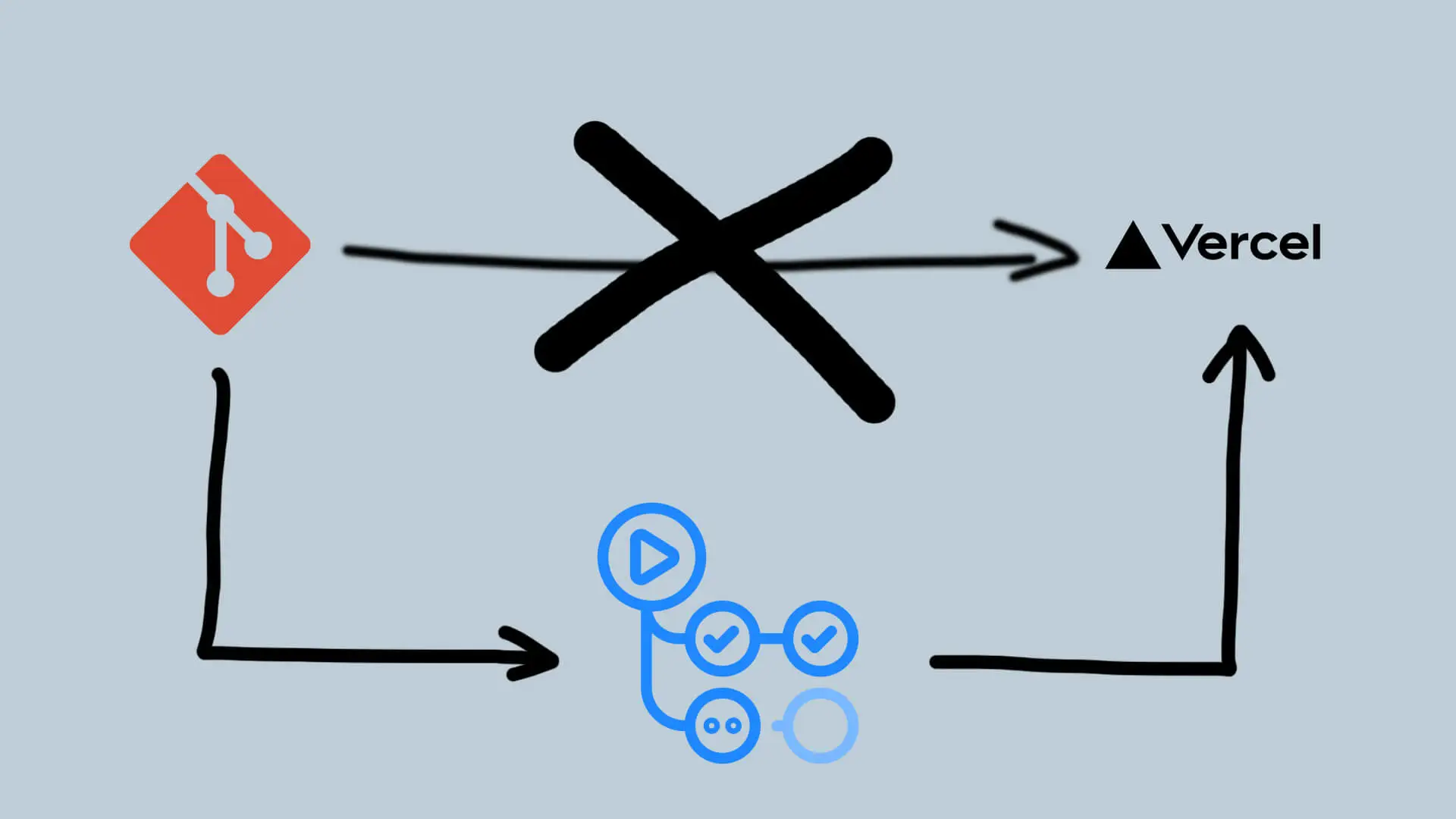
    <p>受不了了！这就用 GitHub Actions 构建站点内容，再上传到 Vercel（擦汗）</p>
    <img src="https://storage.sirvr.win/images/use-github-actions-instead-of-vercel-ci/banner.webp" alt="用 GitHub Actions 替代 Vercel CI">
    <p>请访问 <a href="https://blog.gxres.net/post/use-github-actions-instead-of-vercel-ci/">https://blog.gxres.net/post/use-github-actions-instead-of-vercel-ci/</a> 以阅读全文。</p>
    ]]></content><author><name>Restent Ou</name><uri>https://blog.gxres.net</uri></author></entry><entry><title>使用 Nuxt 重构我的博客</title><id>https://blog.gxres.net/post/rebuild-my-blog-with-nuxt/</id><link rel="alternate" href="https://blog.gxres.net/post/rebuild-my-blog-with-nuxt/" /><updated>2024-04-12T16:00:00.000Z</updated><published>2024-04-12T16:00:00.000Z</published><summary type="html"><![CDATA[在 Valaxy 博客优化到瓶颈、新的需求 Valaxy 也无法满足的情况下，是时候走回原点、用最开始所用的 Nuxt 重构博客了，顺便借助 Nuxt 的强大性及其丰富生态完善博客的功能。]]></summary><content type="html"><![CDATA[
    <p>在 Valaxy 博客优化到瓶颈、新的需求 Valaxy 也无法满足的情况下，是时候走回原点、用最开始所用的 Nuxt 重构博客了，顺便借助 Nuxt 的强大性及其丰富生态完善博客的功能。</p>
    <img src="https://storage.sirvr.win/images/rebuild-my-blog-with-nuxt.webp" alt="使用 Nuxt 重构我的博客">
    <p>请访问 <a href="https://blog.gxres.net/post/rebuild-my-blog-with-nuxt/">https://blog.gxres.net/post/rebuild-my-blog-with-nuxt/</a> 以阅读全文。</p>
    ]]></content><author><name>Restent Ou</name><uri>https://blog.gxres.net</uri></author></entry><entry><title>记一次给网站添加 Umami 统计</title><id>https://blog.gxres.net/post/add-umami-analytics-for-my-site/</id><link rel="alternate" href="https://blog.gxres.net/post/add-umami-analytics-for-my-site/" /><updated>2024-02-20T16:00:00.000Z</updated><published>2024-02-20T16:00:00.000Z</published><summary type="html"><![CDATA[日常滚答辩山，但是这一次有了新发现（？]]></summary><content type="html"><![CDATA[
    <p>日常滚答辩山，但是这一次有了新发现（？</p>
    <img src="https://storage.sirvr.win/images/add-umami-analytics-for-my-site.webp" alt="记一次给网站添加 Umami 统计">
    <p>请访问 <a href="https://blog.gxres.net/post/add-umami-analytics-for-my-site/">https://blog.gxres.net/post/add-umami-analytics-for-my-site/</a> 以阅读全文。</p>
    ]]></content><author><name>Restent Ou</name><uri>https://blog.gxres.net</uri></author></entry></feed>